Introduction
The same three-server application as RA-02, with each role in its own tier. Splitting the subnets is what turns the network ACL from a perimeter control into a control that governs every conversation between your servers. This is the architecture to reach for when "the web server should not be able to talk to the database" needs to be true, not just intended.
What you deploy
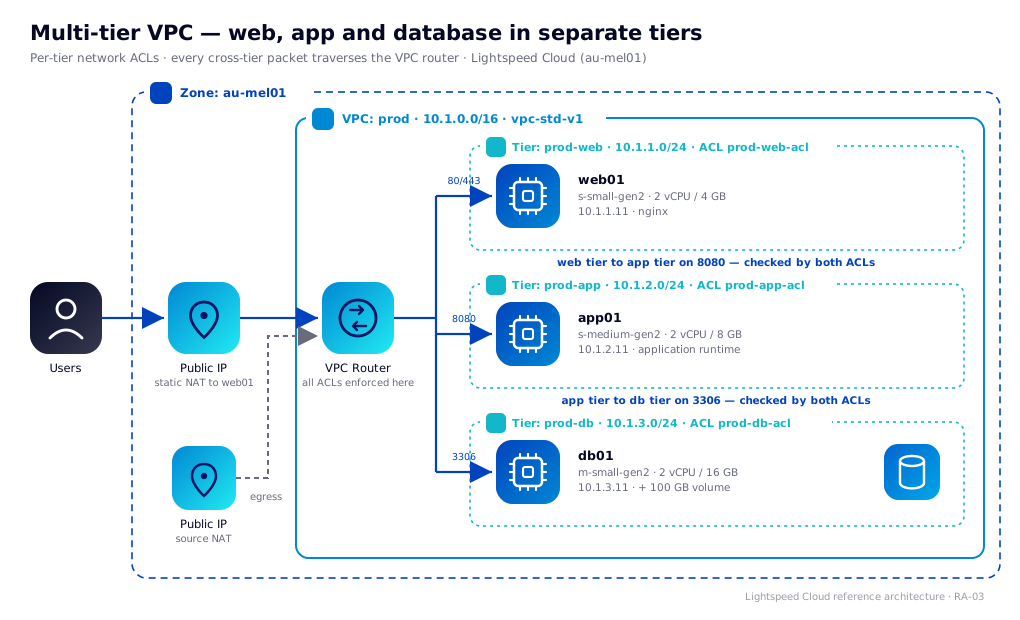
- One VPC (
prod,10.1.0.0/16) onvpc-std-v1with a redundant VPC router. - Three network tiers on
net-vpctier-std-v1:prod-web(10.1.1.0/24),prod-app(10.1.2.0/24) andprod-db(10.1.3.0/24). - Three network ACLs, one per tier, each denying everything not listed.
- Three VMs -
web01,app01anddb01- one per tier, with static guest IPs. - One 100 GB data volume on
db01. - A public IP published to
web01by static NAT.
This suits any application with a real security boundary between its layers: anything holding payment data, health records or personal information, and anything that has to answer a question about network segmentation in an audit. If you don't need that boundary, RA-02 does the same job with one tier and fewer rules to maintain. If you need two of everything behind load balancers, that's RA-04.
Architecture
Traffic flow
Users reach the static NAT public IP. The VPC router applies the prod-web ingress ACL and forwards traffic to web01. When web01 calls app01 on port 8080, the packet leaves the web subnet, crosses the router, and enters the app subnet. When app01 queries db01 on 3306, the same thing happens again.
That is the whole point of the design. In RA-02 those two conversations happened inside a single subnet and no ACL could see them. Here every one of them is routed, and routed traffic is filtered.
The VPC holds a source NAT public IP for outbound traffic from app01 and db01. web01 has its own static NAT IP and uses that for egress.
Resource plan
| Resource | Value | Notes |
|---|---|---|
| Zone | au-mel01 | |
| VPC offering | vpc-std-v1 | Redundant VPC router, NAT, ACLs, VPN, load balancing |
| VPC CIDR | 10.1.0.0/16 | Room for further tiers without renumbering |
| Tier offering | net-vpctier-std-v1 | All three tiers. Network ACL enforced at each tier boundary |
prod-web | 10.1.1.0/24, gateway 10.1.1.1 | Internet facing |
prod-app | 10.1.2.0/24, gateway 10.1.2.1 | No inbound from the internet |
prod-db | 10.1.3.0/24, gateway 10.1.3.1 | No inbound from the internet or the web tier |
web01 | s-small-gen2, 10.1.1.11 | 2 vCPU / 4 GB. nginx or Apache |
app01 | s-medium-gen2, 10.1.2.11 | 2 vCPU / 8 GB. Application runtime on 8080 |
db01 | m-small-gen2, 10.1.3.11 | 2 vCPU / 16 GB. Memory-optimised |
| Root disks | 40 GB each | |
| Data volume | 100 GB on db01 at /var/lib/mysql | |
| Public IPs | 2 | One source NAT IP held by the VPC, one static NAT IP for web01 |
Check these against your account's resource limits before you start.
The compute sizing is identical to RA-02. Splitting into tiers costs you nothing in vCPU or RAM - the price is the routing hop and the rules you now have to maintain.
How ACLs are evaluated
Get this right and the rest of the page is bookkeeping. Get it wrong and you will spend an afternoon wondering why a rule you can plainly see is not working.
Every cross-tier packet is checked twice
A tier's ACL has an ingress list and an egress list, and both are enforced by the VPC router. When web01 sends a packet to app01:
- The packet leaves the web tier. The router evaluates
prod-web-aclegress. If nothing permits TCP 8080 to10.1.2.0/24, it is dropped here. - The packet enters the app tier. The router evaluates
prod-app-aclingress. If nothing permits TCP 8080 from10.1.1.0/24, it is dropped here.
Both must permit it. This is the single most common mistake when moving from a single tier: an ingress rule is added to the destination tier, the source tier's egress is left denying everything, and the connection times out with a perfectly correct-looking rule on screen.
Numbers are unique per list, not per direction
Each ACL holds one numbered sequence covering both directions. A number used by an ingress rule cannot be reused by an egress rule in the same ACL, even though the portal shows them on separate tabs and the two are evaluated independently at runtime.
This page therefore bands them: ingress 100-190, egress 200-290. It costs nothing, it makes a rule's direction obvious from its number in a listing, and it avoids a failure that shows up differently in each tool - an error from the portal and CloudMonkey, and something considerably worse from Ansible, covered in that section.
Rules are ordered, and the first match wins
Rules are evaluated in ascending rule number. The first rule that matches decides the outcome and evaluation stops. Anything reaching the end of the list is denied. That is why the rule numbers below leave gaps of ten - you can insert a rule between 100 and 110 without renumbering the list.
A deny rule is only meaningful if it sits before a broader allow. If your list is allow-only, as the ones below are, ordering doesn't change behaviour and the numbers are just labels.
Return traffic is automatic
The VPC router tracks connections. An allowed outbound request gets its reply back without a matching rule in the opposite direction. You write the rule for the direction the connection is opened in, and only that direction.
Traffic inside a tier is still unfiltered
Nothing here changes what RA-02 established: two VMs in the same subnet talk directly and the ACL never sees it. In this architecture each tier holds one VM, so it doesn't arise. The moment you add web02 alongside web01, those two can reach each other on any port regardless of the ACL, and you're back to needing a host firewall for that pair.
Network ACL plan
Three ACLs, one per tier. Every list is allow-only with an implicit deny at the end.
ACL item with number 100 already exists in ACL. Ingress uses the 100 band throughout this page and egress the 200 band. Keep that split for anything you add.prod-web-acl
| Number | Direction | Protocol | Ports | Peer | Why |
|---|---|---|---|---|---|
| 100 | Ingress | TCP | 80 | 0.0.0.0/0 | Public HTTP |
| 110 | Ingress | TCP | 443 | 0.0.0.0/0 | Public HTTPS |
| 120 | Ingress | TCP | 22 | Admin CIDR | SSH to the jump host |
| 200 | Egress | TCP | 8080 | 10.1.2.0/24 | Calls to the app tier |
| 210 | Egress | TCP | 22 | 10.1.2.0/24 | Jumping to app servers |
| 220 | Egress | TCP | 22 | 10.1.3.0/24 | Jumping to db servers |
| 230 | Egress | TCP | 80 | 0.0.0.0/0 | Package updates |
| 240 | Egress | TCP | 443 | 0.0.0.0/0 | Package updates, ACME |
| 250 | Egress | UDP | 53 | 0.0.0.0/0 | DNS |
| 260 | Egress | TCP | 53 | 0.0.0.0/0 | DNS over TCP |
| 270 | Egress | UDP | 123 | 0.0.0.0/0 | NTP |
prod-app-acl
| Number | Direction | Protocol | Ports | Peer | Why |
|---|---|---|---|---|---|
| 100 | Ingress | TCP | 8080 | 10.1.1.0/24 | Only the web tier may call the app |
| 110 | Ingress | TCP | 22 | 10.1.1.0/24 | SSH via the jump host |
| 200 | Egress | TCP | 3306 | 10.1.3.0/24 | Queries to the db tier |
| 210 | Egress | TCP | 80 | 0.0.0.0/0 | Package updates |
| 220 | Egress | TCP | 443 | 0.0.0.0/0 | Package updates, outbound APIs |
| 230 | Egress | UDP | 53 | 0.0.0.0/0 | DNS |
| 240 | Egress | TCP | 53 | 0.0.0.0/0 | DNS over TCP |
| 250 | Egress | UDP | 123 | 0.0.0.0/0 | NTP |
prod-db-acl
| Number | Direction | Protocol | Ports | Peer | Why |
|---|---|---|---|---|---|
| 100 | Ingress | TCP | 3306 | 10.1.2.0/24 | Only the app tier may reach MySQL |
| 110 | Ingress | TCP | 22 | 10.1.1.0/24 | SSH via the jump host |
| 200 | Egress | TCP | 80 | 0.0.0.0/0 | Package updates |
| 210 | Egress | TCP | 443 | 0.0.0.0/0 | Package updates, backups to object storage |
| 220 | Egress | UDP | 53 | 0.0.0.0/0 | DNS |
| 230 | Egress | TCP | 53 | 0.0.0.0/0 | DNS over TCP |
| 240 | Egress | UDP | 123 | 0.0.0.0/0 | NTP |
Read the two lists together and the design states itself: the web tier may open connections to the app tier on 8080 and nowhere else internally; the app tier may open connections to the db tier on 3306 and nowhere else internally; the db tier may open no internal connections at all. There is no path from web01 to port 3306.
Administrative access
app01 and db01 have no public IP, so SSH to them arrives from web01 acting as a jump host, which is what the port 22 rules above describe. A cleaner option is the VPC's VPN: connect to the VPC and your client address sits inside it, at which point you can replace the jump-host rules with your VPN pool CIDR and drop SSH from the web tier entirely. That's the better posture for anything handling regulated data, because it stops the internet-facing server from being a route to everything else.
Portal walkthrough
1. Register your SSH key
Compute → SSH key pairs → Create SSH key pair. Name it ops-key and paste your public key. See SSH keypairs.
2. Create the VPC
Network → VPC → Add VPC. Name prod, zone au-mel01, super CIDR 10.1.0.0/16, offering vpc-std-v1.
3. Create the three ACLs
Network → VPC → prod → Network ACL lists → Add ACL list, three times: prod-web-acl, prod-app-acl, prod-db-acl. Open each and add its rules from the ACL plan.
egressdefaultpolicy - and that window is exactly when people deploy VMs into it and wonder why nothing answers.4. Create the three tiers
Network → VPC → prod → Add network tier, three times. Offering net-vpctier-std-v1 and netmask 255.255.255.0 for all three, then:
| Name | Gateway | ACL |
|---|---|---|
prod-web | 10.1.1.1 | prod-web-acl |
prod-app | 10.1.2.1 | prod-app-acl |
prod-db | 10.1.3.1 | prod-db-acl |
5. Deploy the three VMs
Compute → Instances → Add instance, three times. Template almalinux-9, SSH key ops-key, root disk 40 GB, and:
| Name | Compute offering | Network | IP address |
|---|---|---|---|
web01 | s-small-gen2 | prod-web | 10.1.1.11 |
app01 | s-medium-gen2 | prod-app | 10.1.2.11 |
db01 | m-small-gen2 | prod-db | 10.1.3.11 |
Each VM goes in exactly one tier. A VM with a NIC in two tiers bypasses the router between them and undoes the segmentation you just built.
6. Add the database volume
Storage → Volumes → Create volume. Name it db01-data, 100 GB, then Attach it to db01.
7. Publish web01
Network → VPC → prod → Public IP addresses → Acquire new IP. On the new IP select Static NAT → Enable, choose web01, and select the prod-web tier when prompted.
Host configuration
Unlike RA-02, the host firewall is no longer load-bearing here - the ACLs enforce the separation. Keeping firewalld on anyway is worth it as defence in depth, and costs nothing:
# app01 - accept 8080 from the web tier only
firewall-cmd --permanent --add-rich-rule='rule family=ipv4 source address=10.1.1.0/24 port port=8080 protocol=tcp accept'
firewall-cmd --reload

# db01 - accept 3306 from the app tier only
firewall-cmd --permanent --add-rich-rule='rule family=ipv4 source address=10.1.2.0/24 port port=3306 protocol=tcp accept'
firewall-cmd --reload
Note these reference tier CIDRs rather than individual VM addresses. That's the practical benefit of one role per subnet: the rule stays correct when you add a second server to a tier, and it doesn't silently stop matching when a VM is rebuilt on a different address.
Prepare the database volume on db01 before installing MySQL or MariaDB:
mkfs.xfs /dev/vdb
mkdir -p /var/lib/mysql
echo '/dev/vdb /var/lib/mysql xfs defaults 0 0' >> /etc/fstab
mount -a
Deploy with CloudMonkey
Configure CloudMonkey with the API key and secret key from your account settings, pointed at https://cloud.lightspeedhosting.com.au/client/api.
1 and 2. SSH key and VPC
cmk register sshkeypair name=ops-key publickey="$(cat ~/.ssh/id_ed25519.pub)"

ZONE=$(cmk list zones name=au-mel01 filter=id | jq -r '.zone[0].id')
VPCOFF=$(cmk list vpcofferings name=vpc-std-v1 filter=id | jq -r '.vpcoffering[0].id')
VPC=$(cmk create vpc name=prod displaytext=prod zoneid=$ZONE \
  cidr=10.1.0.0/16 vpcofferingid=$VPCOFF | jq -r '.vpc.id')
3. The three ACLs and their rules
ADMIN=203.0.113.4/32
WEB=10.1.1.0/24
APP=10.1.2.0/24
DB=10.1.3.0/24

mkacl () {   # name
  cmk create networkacllist name=$1 description="ACL for $1" vpcid=$VPC | jq -r '.networkacllist.id'
}
rule () {    # aclid number ingress|egress proto startport endport cidr
  cmk create networkacl aclid=$1 number=$2 action=allow traffictype=$3 \
    protocol=$4 startport=$5 endport=$6 cidrlist=$7
}

WEBACL=$(mkacl prod-web-acl)
APPACL=$(mkacl prod-app-acl)
DBACL=$(mkacl prod-db-acl)

# prod-web-acl
rule $WEBACL 100 ingress tcp 80   80   0.0.0.0/0
rule $WEBACL 110 ingress tcp 443  443  0.0.0.0/0
rule $WEBACL 120 ingress tcp 22   22   $ADMIN
rule $WEBACL 200 egress  tcp 8080 8080 $APP
rule $WEBACL 210 egress  tcp 22   22   $APP
rule $WEBACL 220 egress  tcp 22   22   $DB
rule $WEBACL 230 egress  tcp 80   80   0.0.0.0/0
rule $WEBACL 240 egress  tcp 443  443  0.0.0.0/0
rule $WEBACL 250 egress  udp 53   53   0.0.0.0/0
rule $WEBACL 260 egress  tcp 53   53   0.0.0.0/0
rule $WEBACL 270 egress  udp 123  123  0.0.0.0/0

# prod-app-acl
rule $APPACL 100 ingress tcp 8080 8080 $WEB
rule $APPACL 110 ingress tcp 22   22   $WEB
rule $APPACL 200 egress  tcp 3306 3306 $DB
rule $APPACL 210 egress  tcp 80   80   0.0.0.0/0
rule $APPACL 220 egress  tcp 443  443  0.0.0.0/0
rule $APPACL 230 egress  udp 53   53   0.0.0.0/0
rule $APPACL 240 egress  tcp 53   53   0.0.0.0/0
rule $APPACL 250 egress  udp 123  123  0.0.0.0/0

# prod-db-acl
rule $DBACL 100 ingress tcp 3306 3306 $APP
rule $DBACL 110 ingress tcp 22   22   $WEB
rule $DBACL 200 egress  tcp 80   80   0.0.0.0/0
rule $DBACL 210 egress  tcp 443  443  0.0.0.0/0
rule $DBACL 220 egress  udp 53   53   0.0.0.0/0
rule $DBACL 230 egress  tcp 53   53   0.0.0.0/0
rule $DBACL 240 egress  udp 123  123  0.0.0.0/0
4. The three tiers
TIEROFF=$(cmk list networkofferings name=net-vpctier-std-v1 filter=id | jq -r '.networkoffering[0].id')

mktier () {  # name gateway aclid
  cmk create network name=$1 displaytext=$1 zoneid=$ZONE \
    networkofferingid=$TIEROFF vpcid=$VPC gateway=$2 netmask=255.255.255.0 \
    aclid=$3 | jq -r '.network.id'
}

WEBTIER=$(mktier prod-web 10.1.1.1 $WEBACL)
APPTIER=$(mktier prod-app 10.1.2.1 $APPACL)
DBTIER=$(mktier prod-db  10.1.3.1 $DBACL)
5 and 6. VMs and the database volume
TMPL=$(cmk list templates templatefilter=executable keyword="almalinux-9" filter=id | jq -r '.template[0].id')

deploy_vm () {  # name offering tierid ip
  OFF=$(cmk list serviceofferings name=$2 filter=id | jq -r '.serviceoffering[0].id')
  cmk deploy virtualmachine name=$1 zoneid=$ZONE templateid=$TMPL \
    serviceofferingid=$OFF networkids=$3 ipaddress=$4 \
    keypair=ops-key rootdisksize=40
}

deploy_vm web01 s-small-gen2  $WEBTIER 10.1.1.11
deploy_vm app01 s-medium-gen2 $APPTIER 10.1.2.11
deploy_vm db01  m-small-gen2  $DBTIER  10.1.3.11

DISKOFF=$(cmk list diskofferings name="Custom" filter=id | jq -r '.diskoffering[0].id')
DBVM=$(cmk list virtualmachines name=db01 filter=id | jq -r '.virtualmachine[0].id')
VOL=$(cmk create volume name=db01-data zoneid=$ZONE diskofferingid=$DISKOFF size=100 | jq -r '.volume.id')
cmk attach volume id=$VOL virtualmachineid=$DBVM
7. Publish web01
WEBVM=$(cmk list virtualmachines name=web01 filter=id | jq -r '.virtualmachine[0].id')
IP=$(cmk associate ipaddress vpcid=$VPC | jq -r '.ipaddress.id')
cmk enable staticnat ipaddressid=$IP virtualmachineid=$WEBVM networkid=$WEBTIER
enable staticnat needs networkid when the public IP belongs to a VPC, so it knows which tier the target VM is on.Deploy with Ansible
Same requirements as RA-01:
ngine_io.cloudstack 3.x. Every module was renamed in 3.0.0 - the cs_ prefix was dropped, so cs_instance is now instance and cs_sshkeypair is now ssh_key. Anything you wrote against 2.x still runs via redirects, but those carry a removal date that has already passed, and each task emits a deprecation warning. 3.0.0 also raised the floor to cs>=3.4.0. Note the --upgrade flag: several distributions bundle 2.5.0, and a plain install will see it and report "Nothing to do".ansible-galaxy collection install ngine_io.cloudstack --upgrade
pip install 'cs>=3.4.0' sshpubkeys
export CLOUDSTACK_ENDPOINT=https://cloud.lightspeedhosting.com.au/client/api
export CLOUDSTACK_KEY=<api key>
export CLOUDSTACK_SECRET=<secret key>All 27 ACL rules are declared as data and built by one loop, which is the main reason this scales better than clicking. Adding a rule is one line.
---
# ra03-multi-tier-vpc.yml - deploy RA-03 multi-tier VPC
- name: RA-03 multi-tier VPC with per-tier network ACLs
  hosts: localhost
  connection: local
  gather_facts: false
  vars:
    zone: au-mel01
    admin_cidr: 203.0.113.4/32
    template: almalinux-9
    vpc_cidr: 10.1.0.0/16
    web_cidr: 10.1.1.0/24
    app_cidr: 10.1.2.0/24
    db_cidr: 10.1.3.0/24

    tiers:
      - {name: prod-web, acl: prod-web-acl, gateway: 10.1.1.1}
      - {name: prod-app, acl: prod-app-acl, gateway: 10.1.2.1}
      - {name: prod-db,  acl: prod-db-acl,  gateway: 10.1.3.1}

    instances:
      - {name: web01, offering: s-small-gen2,  tier: prod-web, ip: 10.1.1.11}
      - {name: app01, offering: s-medium-gen2, tier: prod-app, ip: 10.1.2.11}
      - {name: db01,  offering: m-small-gen2,  tier: prod-db,  ip: 10.1.3.11}

    # Every rule is written once here. Each entry names the ACL it belongs to,
    # so a single loop builds all three ACLs.
    acl_rules:
      # prod-web-acl - ingress from the internet
      - {acl: prod-web-acl, n: 100, t: ingress, p: tcp, s: 80,   e: 80,   cidr: 0.0.0.0/0}
      - {acl: prod-web-acl, n: 110, t: ingress, p: tcp, s: 443,  e: 443,  cidr: 0.0.0.0/0}
      - {acl: prod-web-acl, n: 120, t: ingress, p: tcp, s: 22,   e: 22,   cidr: "{{ admin_cidr }}"}
      # prod-web-acl - egress to the app tier and the internet.
      # Egress uses the 200 band: numbers are unique per ACL LIST, not per
      # direction, and network_acl_rule matches on the number ALONE - an
      # egress rule reusing an ingress number silently rewrites it.
      - {acl: prod-web-acl, n: 200, t: egress,  p: tcp, s: 8080, e: 8080, cidr: "{{ app_cidr }}"}
      - {acl: prod-web-acl, n: 210, t: egress,  p: tcp, s: 22,   e: 22,   cidr: "{{ app_cidr }}"}
      - {acl: prod-web-acl, n: 220, t: egress,  p: tcp, s: 22,   e: 22,   cidr: "{{ db_cidr }}"}
      - {acl: prod-web-acl, n: 230, t: egress,  p: tcp, s: 80,   e: 80,   cidr: 0.0.0.0/0}
      - {acl: prod-web-acl, n: 240, t: egress,  p: tcp, s: 443,  e: 443,  cidr: 0.0.0.0/0}
      - {acl: prod-web-acl, n: 250, t: egress,  p: udp, s: 53,   e: 53,   cidr: 0.0.0.0/0}
      - {acl: prod-web-acl, n: 260, t: egress,  p: tcp, s: 53,   e: 53,   cidr: 0.0.0.0/0}
      - {acl: prod-web-acl, n: 270, t: egress,  p: udp, s: 123,  e: 123,  cidr: 0.0.0.0/0}

      # prod-app-acl - ingress from the web tier only
      - {acl: prod-app-acl, n: 100, t: ingress, p: tcp, s: 8080, e: 8080, cidr: "{{ web_cidr }}"}
      - {acl: prod-app-acl, n: 110, t: ingress, p: tcp, s: 22,   e: 22,   cidr: "{{ web_cidr }}"}
      # prod-app-acl - egress to the db tier and the internet
      - {acl: prod-app-acl, n: 200, t: egress,  p: tcp, s: 3306, e: 3306, cidr: "{{ db_cidr }}"}
      - {acl: prod-app-acl, n: 210, t: egress,  p: tcp, s: 80,   e: 80,   cidr: 0.0.0.0/0}
      - {acl: prod-app-acl, n: 220, t: egress,  p: tcp, s: 443,  e: 443,  cidr: 0.0.0.0/0}
      - {acl: prod-app-acl, n: 230, t: egress,  p: udp, s: 53,   e: 53,   cidr: 0.0.0.0/0}
      - {acl: prod-app-acl, n: 240, t: egress,  p: tcp, s: 53,   e: 53,   cidr: 0.0.0.0/0}
      - {acl: prod-app-acl, n: 250, t: egress,  p: udp, s: 123,  e: 123,  cidr: 0.0.0.0/0}

      # prod-db-acl - ingress from the app tier only
      - {acl: prod-db-acl, n: 100, t: ingress, p: tcp, s: 3306, e: 3306, cidr: "{{ app_cidr }}"}
      - {acl: prod-db-acl, n: 110, t: ingress, p: tcp, s: 22,   e: 22,   cidr: "{{ web_cidr }}"}
      # prod-db-acl - egress to the internet only
      - {acl: prod-db-acl, n: 200, t: egress,  p: tcp, s: 80,   e: 80,   cidr: 0.0.0.0/0}
      - {acl: prod-db-acl, n: 210, t: egress,  p: tcp, s: 443,  e: 443,  cidr: 0.0.0.0/0}
      - {acl: prod-db-acl, n: 220, t: egress,  p: udp, s: 53,   e: 53,   cidr: 0.0.0.0/0}
      - {acl: prod-db-acl, n: 230, t: egress,  p: tcp, s: 53,   e: 53,   cidr: 0.0.0.0/0}
      - {acl: prod-db-acl, n: 240, t: egress,  p: udp, s: 123,  e: 123,  cidr: 0.0.0.0/0}

  tasks:
    - name: Register SSH key
      ngine_io.cloudstack.ssh_key:
        name: ops-key
        public_key: "{{ lookup('file', '~/.ssh/id_ed25519.pub') }}"

    - name: Create VPC
      ngine_io.cloudstack.vpc:
        name: prod
        zone: "{{ zone }}"
        cidr: "{{ vpc_cidr }}"
        vpc_offering: vpc-std-v1

    - name: Create the three network ACLs
      ngine_io.cloudstack.network_acl:
        name: "{{ item.acl }}"
        description: "ACL for the {{ item.name }} tier"
        vpc: prod
        zone: "{{ zone }}"
      loop: "{{ tiers }}"

    - name: Create all ACL rules
      ngine_io.cloudstack.network_acl_rule:
        network_acl: "{{ item.acl }}"
        vpc: prod
        zone: "{{ zone }}"
        rule_position: "{{ item.n }}"
        action_policy: allow
        traffic_type: "{{ item.t }}"
        protocol: "{{ item.p }}"
        start_port: "{{ item.s }}"
        end_port: "{{ item.e }}"
        cidrs: ["{{ item.cidr }}"]
      loop: "{{ acl_rules }}"
      loop_control:
        label: "{{ item.acl }} {{ item.t }} {{ item.n }}"

    - name: Create the three tiers
      ngine_io.cloudstack.network:
        name: "{{ item.name }}"
        zone: "{{ zone }}"
        vpc: prod
        acl: "{{ item.acl }}"
        network_offering: net-vpctier-std-v1
        gateway: "{{ item.gateway }}"
        netmask: 255.255.255.0
      loop: "{{ tiers }}"

    - name: Deploy instances
      ngine_io.cloudstack.instance:
        name: "{{ item.name }}"
        zone: "{{ zone }}"
        template: "{{ template }}"
        service_offering: "{{ item.offering }}"
        networks: ["{{ item.tier }}"]
        ip_address: "{{ item.ip }}"
        ssh_keys: [ops-key]
        root_disk_size: 40
      loop: "{{ instances }}"

    - name: Create and attach the database volume
      ngine_io.cloudstack.volume:
        name: db01-data
        zone: "{{ zone }}"
        disk_offering: Custom
        size: 100
        vm: db01
        state: attached

    - name: Acquire public IP on the VPC
      ngine_io.cloudstack.ip_address:
        zone: "{{ zone }}"
        vpc: prod
        tags:
          - key: purpose
            value: web01-staticnat
      register: pub

    - name: Enable static NAT to web01
      ngine_io.cloudstack.static_nat:
        ip_address: "{{ pub.ip_address }}"
        vm: web01
        vpc: prod
        network: prod-web
        zone: "{{ zone }}"

    - name: Show public IP
      ansible.builtin.debug:
        msg: "web01 is reachable at {{ pub.ip_address }}"
rule_position is the ACL rule number, and the module matches on it alone - it never compares traffic type. Give an egress rule a number an ingress rule already holds and the module finds that ingress rule and rewrites it into an egress rule. You get fewer rules than you declared, no error, and a playbook that reports success. This is the strongest reason to band the numbers: within one direction, reusing a number to update in place is exactly what makes re-runs idempotent, but across directions it is silent data loss.Deploy with Terraform
# ra03-multi-tier-vpc.tf - deploy RA-03 multi-tier VPC
terraform {
  required_providers {
    cloudstack = {
      source  = "cloudstack/cloudstack"
      version = "~> 0.6.0"
    }
  }
}

variable "api_url"    { default = "https://cloud.lightspeedhosting.com.au/client/api" }
variable "api_key"    { sensitive = true }
variable "secret_key" { sensitive = true }
variable "admin_cidr" { default = "203.0.113.4/32" }

provider "cloudstack" {
  api_url    = var.api_url
  api_key    = var.api_key
  secret_key = var.secret_key
}

locals {
  zone     = "au-mel01"
  web_cidr = "10.1.1.0/24"
  app_cidr = "10.1.2.0/24"
  db_cidr  = "10.1.3.0/24"

  instances = {
    web01 = { offering = "s-small-gen2",  tier = "web", ip = "10.1.1.11" }
    app01 = { offering = "s-medium-gen2", tier = "app", ip = "10.1.2.11" }
    db01  = { offering = "m-small-gen2",  tier = "db",  ip = "10.1.3.11" }
  }
}

resource "cloudstack_ssh_keypair" "ops" {
  name       = "ops-key"
  public_key = file("~/.ssh/id_ed25519.pub")
}

resource "cloudstack_vpc" "prod" {
  name         = "prod"
  display_text = "prod"
  cidr         = "10.1.0.0/16"
  vpc_offering = "vpc-std-v1"
  zone         = local.zone
}

# ---------- ACLs ----------

resource "cloudstack_network_acl" "web" {
  name        = "prod-web-acl"
  description = "ACL for the prod-web tier"
  vpc_id      = cloudstack_vpc.prod.id
}

resource "cloudstack_network_acl" "app" {
  name        = "prod-app-acl"
  description = "ACL for the prod-app tier"
  vpc_id      = cloudstack_vpc.prod.id
}

resource "cloudstack_network_acl" "db" {
  name        = "prod-db-acl"
  description = "ACL for the prod-db tier"
  vpc_id      = cloudstack_vpc.prod.id
}

# One rule block per port, mirroring the numbered ACL plan exactly.
# 0.6.0 removed the plural `ports` list; it remains in the schema so validate
# and plan pass, and apply fails. Use singular `port`, and set rule_number
# explicitly because rules are created concurrently.
resource "cloudstack_network_acl_rule" "web" {
  acl_id = cloudstack_network_acl.web.id

  rule {
    rule_number  = 100
    action       = "allow"
    cidr_list    = ["0.0.0.0/0"]
    protocol     = "tcp"
    port         = "80"
    traffic_type = "ingress"
  }

  rule {
    rule_number  = 110
    action       = "allow"
    cidr_list    = ["0.0.0.0/0"]
    protocol     = "tcp"
    port         = "443"
    traffic_type = "ingress"
  }

  rule {
    rule_number  = 120
    action       = "allow"
    cidr_list    = [var.admin_cidr]
    protocol     = "tcp"
    port         = "22"
    traffic_type = "ingress"
  }

  rule {
    rule_number  = 200
    action       = "allow"
    cidr_list    = [local.app_cidr]
    protocol     = "tcp"
    port         = "8080"
    traffic_type = "egress"
  }

  rule {
    rule_number  = 210
    action       = "allow"
    cidr_list    = [local.app_cidr]
    protocol     = "tcp"
    port         = "22"
    traffic_type = "egress"
  }

  rule {
    rule_number  = 220
    action       = "allow"
    cidr_list    = [local.db_cidr]
    protocol     = "tcp"
    port         = "22"
    traffic_type = "egress"
  }

  rule {
    rule_number  = 230
    action       = "allow"
    cidr_list    = ["0.0.0.0/0"]
    protocol     = "tcp"
    port         = "80"
    traffic_type = "egress"
  }

  rule {
    rule_number  = 240
    action       = "allow"
    cidr_list    = ["0.0.0.0/0"]
    protocol     = "tcp"
    port         = "443"
    traffic_type = "egress"
  }

  rule {
    rule_number  = 250
    action       = "allow"
    cidr_list    = ["0.0.0.0/0"]
    protocol     = "udp"
    port         = "53"
    traffic_type = "egress"
  }

  rule {
    rule_number  = 260
    action       = "allow"
    cidr_list    = ["0.0.0.0/0"]
    protocol     = "tcp"
    port         = "53"
    traffic_type = "egress"
  }

  rule {
    rule_number  = 270
    action       = "allow"
    cidr_list    = ["0.0.0.0/0"]
    protocol     = "udp"
    port         = "123"
    traffic_type = "egress"
  }
}

resource "cloudstack_network_acl_rule" "app" {
  acl_id = cloudstack_network_acl.app.id

  rule {
    rule_number  = 100
    action       = "allow"
    cidr_list    = [local.web_cidr]
    protocol     = "tcp"
    port         = "8080"
    traffic_type = "ingress"
  }

  rule {
    rule_number  = 110
    action       = "allow"
    cidr_list    = [local.web_cidr]
    protocol     = "tcp"
    port         = "22"
    traffic_type = "ingress"
  }

  rule {
    rule_number  = 200
    action       = "allow"
    cidr_list    = [local.db_cidr]
    protocol     = "tcp"
    port         = "3306"
    traffic_type = "egress"
  }

  rule {
    rule_number  = 210
    action       = "allow"
    cidr_list    = ["0.0.0.0/0"]
    protocol     = "tcp"
    port         = "80"
    traffic_type = "egress"
  }

  rule {
    rule_number  = 220
    action       = "allow"
    cidr_list    = ["0.0.0.0/0"]
    protocol     = "tcp"
    port         = "443"
    traffic_type = "egress"
  }

  rule {
    rule_number  = 230
    action       = "allow"
    cidr_list    = ["0.0.0.0/0"]
    protocol     = "udp"
    port         = "53"
    traffic_type = "egress"
  }

  rule {
    rule_number  = 240
    action       = "allow"
    cidr_list    = ["0.0.0.0/0"]
    protocol     = "tcp"
    port         = "53"
    traffic_type = "egress"
  }

  rule {
    rule_number  = 250
    action       = "allow"
    cidr_list    = ["0.0.0.0/0"]
    protocol     = "udp"
    port         = "123"
    traffic_type = "egress"
  }
}

resource "cloudstack_network_acl_rule" "db" {
  acl_id = cloudstack_network_acl.db.id

  rule {
    rule_number  = 100
    action       = "allow"
    cidr_list    = [local.app_cidr]
    protocol     = "tcp"
    port         = "3306"
    traffic_type = "ingress"
  }

  rule {
    rule_number  = 110
    action       = "allow"
    cidr_list    = [local.web_cidr]
    protocol     = "tcp"
    port         = "22"
    traffic_type = "ingress"
  }

  rule {
    rule_number  = 200
    action       = "allow"
    cidr_list    = ["0.0.0.0/0"]
    protocol     = "tcp"
    port         = "80"
    traffic_type = "egress"
  }

  rule {
    rule_number  = 210
    action       = "allow"
    cidr_list    = ["0.0.0.0/0"]
    protocol     = "tcp"
    port         = "443"
    traffic_type = "egress"
  }

  rule {
    rule_number  = 220
    action       = "allow"
    cidr_list    = ["0.0.0.0/0"]
    protocol     = "udp"
    port         = "53"
    traffic_type = "egress"
  }

  rule {
    rule_number  = 230
    action       = "allow"
    cidr_list    = ["0.0.0.0/0"]
    protocol     = "tcp"
    port         = "53"
    traffic_type = "egress"
  }

  rule {
    rule_number  = 240
    action       = "allow"
    cidr_list    = ["0.0.0.0/0"]
    protocol     = "udp"
    port         = "123"
    traffic_type = "egress"
  }
}

# ---------- Tiers ----------

resource "cloudstack_network" "web" {
  name             = "prod-web"
  cidr             = local.web_cidr
  network_offering = "net-vpctier-std-v1"
  vpc_id           = cloudstack_vpc.prod.id
  acl_id           = cloudstack_network_acl.web.id
  zone             = local.zone
}

resource "cloudstack_network" "app" {
  name             = "prod-app"
  cidr             = local.app_cidr
  network_offering = "net-vpctier-std-v1"
  vpc_id           = cloudstack_vpc.prod.id
  acl_id           = cloudstack_network_acl.app.id
  zone             = local.zone
}

resource "cloudstack_network" "db" {
  name             = "prod-db"
  cidr             = local.db_cidr
  network_offering = "net-vpctier-std-v1"
  vpc_id           = cloudstack_vpc.prod.id
  acl_id           = cloudstack_network_acl.db.id
  zone             = local.zone
}

# A small map from tier name to network id, so the instance block can look
# its tier up rather than repeating the three resource references.
locals {
  tier_ids = {
    web = cloudstack_network.web.id
    app = cloudstack_network.app.id
    db  = cloudstack_network.db.id
  }
}

# ---------- Instances ----------

resource "cloudstack_instance" "vm" {
  for_each = local.instances

  name             = each.key
  zone             = local.zone
  template         = "almalinux-9"
  service_offering = each.value.offering
  network_id       = local.tier_ids[each.value.tier]
  ip_address       = each.value.ip
  keypair          = cloudstack_ssh_keypair.ops.name
  root_disk_size   = 40
  expunge          = true
}

resource "cloudstack_disk" "db_data" {
  name               = "db01-data"
  zone               = local.zone
  disk_offering      = "Custom"
  size               = 100
  attach             = true
  virtual_machine_id = cloudstack_instance.vm["db01"].id
}

resource "cloudstack_ipaddress" "web" {
  zone   = local.zone
  vpc_id = cloudstack_vpc.prod.id
}

resource "cloudstack_static_nat" "web01" {
  ip_address_id      = cloudstack_ipaddress.web.id
  virtual_machine_id = cloudstack_instance.vm["web01"].id
}

output "web_public_ip" {
  value = cloudstack_ipaddress.web.ip_address
}
terraform init
terraform validate
terraform apply -var api_key=... -var secret_key=...Three things to know about the provider before you run this:
- Use
port, notports. Version 0.6.0 replaced the plural list with a single port string and rejects the old field at create time.portsis still in the schema, soterraform validateandterraform planboth pass and the failure appears only onapply:The 'ports' field is no longer supported for creating new rules. - Set
rule_numberexplicitly. The provider creates rules concurrently -parallelismdefaults to 2 - so numbers assigned for you will not follow the order of the blocks in your configuration. Setting them keeps the ACL matching the plan above, which matters here because the whole page is written around specific numbers. cloudstack_static_natworks on a VPC despite having nonetwork_idargument. It doesn't need one: the provider looks up the VM and sends the network id of its primary NIC. Setvm_guest_ipto choose a specific NIC on a multi-NIC VM. The failure mode worth knowing is avm_guest_ipmatching no NIC - then no network id is sent and the API returnsIP is not associated with any Network and no networkId is passed in.
Verify
The first four confirm the application works. The last two confirm the segmentation is real, and they're the ones worth keeping as a regression test.
curl -I http://<public-ip>reachesweb01.- SSH to
web01works from your admin CIDR and times out from anywhere else. - From
web01,nc -vz 10.1.2.11 8080succeeds. - From
app01,nc -vz 10.1.3.11 3306succeeds. - From
web01,nc -vz 10.1.3.11 3306must fail. There is no rule inprod-web-aclegress permitting 3306 to the db tier, and no rule inprod-db-aclingress permitting it from the web tier. This is the test that fails in RA-02 and passes here, and it's the reason the architecture exists. - From
db01,nc -vz 10.1.1.11 80must fail. The database has no egress rule to the web tier, so a compromised database cannot call back into the front end. - Count the rules in each ACL.
prod-web-aclshould hold 11 (3 ingress, 8 egress),prod-app-acl8 (2 ingress, 6 egress),prod-db-acl7 (2 ingress, 5 egress). A short count means a number was reused across directions - the one failure here that Ansible reports as success.
Day 2 operations
- Adding a port between tiers is two rules, not one. Egress on the source tier and ingress on the destination tier. Put both in the same change.
- Changing ACL rules is non-disruptive. Rules take effect on the VPC router immediately with no VM restart. Adding or removing a tier restarts the router, which briefly interrupts NAT and VPN, so do that in a window.
- Keep the ACLs in version control. The rule set is the security design. The Ansible variables above are a readable, reviewable form of it, and a diff on that file is a far better change record than a screenshot of the portal.
- Adding a second server to a tier. The ACLs already reference tier CIDRs, so no rule changes are needed. Remember that the new VM and its neighbour can reach each other on any port - same subnet, no filtering - so a host firewall comes back into play for that pair. Two per tier behind load balancers is RA-04.
- Snapshots and backups. Schedule recurring snapshots on
db01's data volume, and run a logical database dump to object storage. A snapshot is not a database backup. - Scaling up. Stop the VM and change its compute offering. See resizing a VM.
- Replace the jump host with the VPN. Once the VPC's VPN is configured, drop the port 22 rules that allow the web tier into the app and db tiers, and allow SSH from your VPN pool instead. It removes the internet-facing server from the administrative path entirely.